Note
This page was generated from tut/full-design-examples/Reference-design-3-Four-qubit-multiplexed-readout.ipynb.
Reference design 3 — Four-qubit multiplexed readout
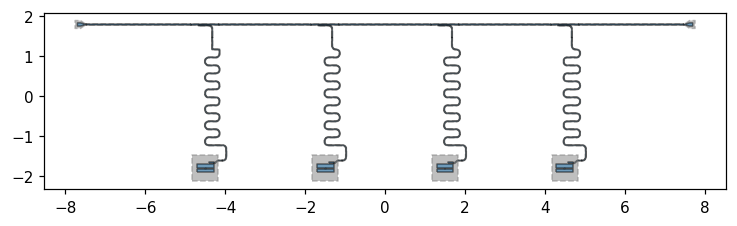
A four-transmon chip with frequency-multiplexed dispersive readout: four resonators of stepped length share one coplanar-waveguide feedline — the standard readout architecture for small superconducting processors.
Reference design — attribution. Adapted, with attribution, from the open-source SQDMetal project (Apache-2.0) and its benchmark devices in D. Sommers, P. Pakkiam, Z. Degnan, C.-C. Chiu, D. Gautam, Y.-H. Chen, and A. Fedorov, “Open-Source Highly Parallel Electromagnetic Simulations for Superconducting Circuits,” arXiv:2511.01220 (2025). Re-implemented here with stock Quantum Metal components.
[1]:
# In Colab / Binder, uncomment to install Quantum Metal (lite, no Qt):
# !pip install -q quantum-metal
[2]:
import qiskit_metal as qm
from qiskit_metal import Dict, designs
from qiskit_metal.qlibrary.qubits.transmon_pocket import TransmonPocket
from qiskit_metal.qlibrary.tlines.meandered import RouteMeander
from qiskit_metal.qlibrary.tlines.pathfinder import RoutePathfinder
from qiskit_metal.qlibrary.couplers.coupled_line_tee import CoupledLineTee
from qiskit_metal.qlibrary.terminations.launchpad_wb import LaunchpadWirebond

design = designs.DesignPlanar()
design.overwrite_enabled = True

# The default die is 9mm x 6mm; the launchpads below sit outside it.
design.chips.main.size.size_x = "16mm"
design.chips.main.size.size_y = "9mm"
09:27PM 23s INFO [_start_renderers]: Renderer=gmsh skipped: runtime dependency not installed (renderer_gmsh requires gmsh. Install with: pip install 'quantum-metal[mesh]' (or the legacy alias 'quantum-metal[fem]')).
[3]:
def feed(a, ap, b, bp, name):
    """Auto-route a coplanar-waveguide feedline segment between two pins."""
    RoutePathfinder(
        design,
        name,
        options=dict(
            fillet="90um",
            pin_inputs=Dict(
                start_pin=Dict(component=a, pin=ap), end_pin=Dict(component=b, pin=bp)
            ),
        ),
    )


def readout(clt, q, name, length):
    """Meandered lambda/4 readout resonator: coupled-line tee -> qubit readout pad."""
    RouteMeander(
        design,
        name,
        options=dict(
            fillet="90um",
            total_length=length,
            lead=Dict(start_straight="100um", end_straight="100um"),
            pin_inputs=Dict(
                start_pin=Dict(component=clt, pin="second_end"),
                end_pin=Dict(component=q, pin="readout"),
            ),
        ),
    )
1. Four transmons + four readout tees
Four transmons in a row; above each, a coupled-line tee on a single shared feedline.
[4]:
xs = [-4.5, -1.5, 1.5, 4.5]
for i, x in enumerate(xs, 1):
    TransmonPocket(
        design,
        f"Q{i}",
        options=dict(
            pos_x=f"{x}mm",
            pos_y="-1.8mm",
            pad_width="425um",
            pocket_height="650um",
            connection_pads=dict(readout=dict(loc_W=1, loc_H=1)),
        ),
    )
    CoupledLineTee(
        design,
        f"clt{i}",
        options=dict(
            pos_x=f"{x}mm",
            pos_y="1.8mm",
            coupling_length="350um",
            down_length="300um",
            fillet="90um",
            open_termination=False,
        ),
    )
3. Four frequency-multiplexed readout resonators
Stepped lengths -> distinct readout frequencies on the one feedline.
[6]:
for i, L in zip(range(1, 5), ["6.8mm", "7.0mm", "7.2mm", "7.4mm"]):
    readout(f"clt{i}", f"Q{i}", f"read{i}", L)
09:27PM 23s WARNING [check_lengths]: For path table, component=read1, key=trace has short segments that could cause issues with fillet. Values in (1-2)  are index(es) in shapely geometry.
09:27PM 23s WARNING [check_lengths]: For path table, component=read1, key=cut has short segments that could cause issues with fillet. Values in (1-2)  are index(es) in shapely geometry.
4. Visualize
Next steps
Inspect the design tree:
design.components.keys()anddesign.qgeometry.tables.Export GDS for fabrication:
design.renderers.gds.export_to_gds('chip.gds')(Quantum Metal uses the moderngdstkbackend).Simulate: render to Ansys HFSS/Q3D (the validation gold standard) or to the open-source FEM path (Gmsh + Elmer today; AWS Palace on the roadmap) to extract eigenmodes, Q, and the capacitance matrix.
Tweak: every dimension above is a parameter — change
total_lengthto retune resonator frequencies, orpos_x/pos_yto relayout.
[7]:
design.components.keys()
[7]:
['Q1',
 'clt1',
 'Q2',
 'clt2',
 'Q3',
 'clt3',
 'Q4',
 'clt4',
 'LPin',
 'LPout',
 'f0',
 'f1',
 'f2',
 'f3',
 'f4',
 'read1',
 'read2',
 'read3',
 'read4']
[8]:
fig = qm.view(design)
qm.show_inline(fig)
For more information, review the Introduction to Quantum Computing and Quantum Hardware lectures below
|
Lecture Video | Lecture Notes | Lab |
|
Lecture Video | Lecture Notes | Lab |
|
Lecture Video | Lecture Notes | Lab |
|
Lecture Video | Lecture Notes | Lab |
|
Lecture Video | Lecture Notes | Lab |
|
Lecture Video | Lecture Notes | Lab |