Note
This page was generated from tut/quick-topics/Managing-pins.ipynb.
Managing pins
[2]:
import qiskit_metal as metal
from qiskit_metal import designs, draw
from qiskit_metal import MetalGUI, Dict, Headings

Headings.h1("Welcome to Qiskit Metal")
Welcome to Qiskit Metal
[3]:
design = designs.DesignPlanar()
gui = MetalGUI(design)
First we create some transmon pockets to have a number of pins generated for use.
[4]:
from qiskit_metal.qlibrary.qubits.transmon_pocket import TransmonPocket

## Custom options for all the transmons
options = dict(
    # Some options we want to modify from the deafults
    # (see below for defaults)
    pad_width="425 um",
    pocket_height="650um",
    # Adding 4 connectors (see below for defaults)
    connection_pads=dict(
        a=dict(loc_W=+1, loc_H=+1),
        b=dict(loc_W=-1, loc_H=+1, pad_height="30um"),
        c=dict(loc_W=+1, loc_H=-1, pad_width="200um"),
        d=dict(loc_W=-1, loc_H=-1, pad_height="50um"),
    ),
)

## Create 4 transmons

q1 = TransmonPocket(
    design, "Q1", options=dict(pos_x="+2.4mm", pos_y="+0.0mm", **options)
)
q2 = TransmonPocket(
    design,
    "Q2",
    options=dict(pos_x="+0.0mm", pos_y="-0.9mm", orientation="90", **options),
)
q3 = TransmonPocket(
    design, "Q3", options=dict(pos_x="-2.4mm", pos_y="+0.0mm", **options)
)
q4 = TransmonPocket(
    design,
    "Q4",
    options=dict(pos_x="+0.0mm", pos_y="+0.9mm", orientation="90", **options),
)

## Rebuild the design
gui.rebuild()
gui.autoscale()
Selecting the different components via the GUI shows the pins said component has. You can also see this via;
[5]:
design.components.Q1.pins.keys()
[5]:
dict_keys(['a', 'b', 'c', 'd'])
Each pin contains a dictionary of information which can be used by other components or renderers.
[6]:
design.components.Q1.pins.a
[6]:
{'points': [array([2.825, 0.2  ]), array([2.825, 0.19 ])],
 'middle': array([2.825, 0.195]),
 'normal': array([1., 0.]),
 'tangent': array([0., 1.]),
 'width': 0.01,
 'gap': 0.006,
 'chip': 'main',
 'parent_name': 1,
 'net_id': 0,
 'length': 0}
We can pass these pins into some components to auto generate connections, such as CPW lines.
[7]:
from qiskit_metal.qlibrary.tlines.straight_path import RouteStraight

c1 = RouteStraight(
    design,
    "c1",
    type="Route",
    options=dict(
        pin_inputs=dict(
            start_pin=dict(component="Q1", pin="d"),
            end_pin=dict(component="Q2", pin="c"),
        )
    ),
)
gui.rebuild()
gui.autoscale()
The example CPW also automatically generates it’s own pins based on the pin inputs it was given. This is to allow for such a component to not be destroyed if the component it is attached to is deleted.
[8]:
design.components.c1.pins
[8]:
{'start': {'points': array([[ 1.975, -0.19 ],
         [ 1.975, -0.2  ]]),
  'middle': array([ 1.975, -0.195]),
  'normal': array([ 1., -0.]),
  'tangent': array([ 0., -1.]),
  'width': 0.01,
  'gap': 0.006,
  'chip': 'main',
  'parent_name': 5,
  'net_id': 3,
  'length': 0},
 'end': {'points': array([[ 0.2  , -0.475],
         [ 0.19 , -0.475]]),
  'middle': array([ 0.195, -0.475]),
  'normal': array([-0., -1.]),
  'tangent': array([-1.,  0.]),
  'width': 0.01,
  'gap': 0.006,
  'chip': 'main',
  'parent_name': 5,
  'net_id': 4,
  'length': 0}}
We can also see what active connections there are from the netlist. Pins that share the same net_id indicate they are connected. Pins that are not on the net list are currently open.
[9]:
design.net_info
[9]:
| net_id | component_id | pin_name | |
|---|---|---|---|
| 0 | 3 | 1 | d |
| 1 | 3 | 5 | start |
| 2 | 4 | 2 | c |
| 3 | 4 | 5 | end |
What happens if we try to pass in a component/pin combo that doesn’t exist?
[10]:
# A component that doesn't exist
c2 = RouteStraight(
    design,
    "c2",
    type="Route",
    options=dict(
        pin_inputs=dict(
            start_pin=dict(component="NotReallyHere", pin="d"),
            end_pin=dict(component="Q2", pin="a"),
        )
    ),
)
04:25PM 48s WARNING [__init__]: Component NotReallyHere does not exist. c2 has not been built. Please check your pin_input values.
[11]:
# A pin that doesn't exist
c3 = RouteStraight(
    design,
    "c3",
    type="Route",
    options=dict(
        pin_inputs=dict(
            start_pin=dict(component="Q1", pin="NotReallyHere"),
            end_pin=dict(component="Q2", pin="a"),
        )
    ),
)
04:25PM 48s WARNING [__init__]: Pin NotReallyHere does not exist in component Q1. c3 has not been built. Please check your pin_input values.
Or if try to pass in a pin that is already connected.
[12]:
c4 = RouteStraight(
    design,
    "c4",
    type="Route",
    options=dict(
        pin_inputs=dict(
            start_pin=dict(component="Q1", pin="b"),
            end_pin=dict(component="Q2", pin="c"),
        )
    ),
)
04:25PM 48s WARNING [__init__]: Pin c of component Q2 is already in use. c4 has not been built. Please check your pin_input values.
pin_inputs is the default dictionary for passing pins into a component, BUT how the dictionary is structured is component dependent. Using the above structure (eg. start_pin, end_pin) is suggested for any 2 port type connection, but you should always check the documentation for the specific component you are wanting to use.
[13]:
Headings.h1("CPW Examples")
CPW Examples
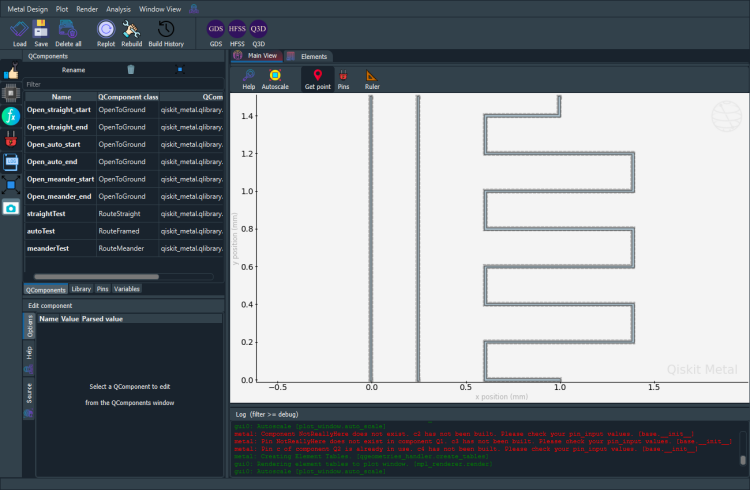
An example set showing some current functional CPW components, including both simple auto-routing and meandering
[14]:
design.delete_all_components()
[15]:
from qiskit_metal.qlibrary.terminations.open_to_ground import OpenToGround
from qiskit_metal.qlibrary.tlines.framed_path import RouteFramed
from qiskit_metal.qlibrary.tlines.straight_path import RouteStraight
from qiskit_metal.qlibrary.tlines.meandered import RouteMeander
[16]:
open_start_straight = OpenToGround(
    design,
    "Open_straight_start",
    options=Dict(pos_x="0um", pos_y="0um", orientation="-90"),
)
open_end_straight = OpenToGround(
    design,
    "Open_straight_end",
    options=Dict(pos_x="0um", pos_y="1500um", orientation="90"),
)

open_start_auto = OpenToGround(
    design,
    "Open_auto_start",
    options=Dict(pos_x="250um", pos_y="0um", orientation="-90"),
)
open_end_auto = OpenToGround(
    design,
    "Open_auto_end",
    options=Dict(pos_x="250um", pos_y="1500um", orientation="0"),
)

open_start_meander = OpenToGround(
    design,
    "Open_meander_start",
    options=Dict(pos_x="1000um", pos_y="0um", orientation="-90"),
)
open_end_meander = OpenToGround(
    design,
    "Open_meander_end",
    options=Dict(pos_x="1000um", pos_y="1500um", orientation="90"),
)

testStraight = RouteStraight(
    design,
    "straightTest",
    options=Dict(
        pin_inputs=Dict(
            start_pin=Dict(component="Open_straight_start", pin="open"),
            end_pin=Dict(component="Open_straight_end", pin="open"),
        )
    ),
)

testAuto = RouteFramed(
    design,
    "autoTest",
    options=Dict(
        pin_inputs=Dict(
            start_pin=Dict(component="Open_auto_start", pin="open"),
            end_pin=Dict(component="Open_auto_end", pin="open"),
        )
    ),
)

testMeander = RouteMeander(
    design,
    "meanderTest",
    options=Dict(
        pin_inputs=Dict(
            start_pin=Dict(component="Open_meander_start", pin="open"),
            end_pin=Dict(component="Open_meander_end", pin="open"),
        )
    ),
)
gui.rebuild()
gui.autoscale()
[17]:
gui.screenshot()
For more information, review the Introduction to Quantum Computing and Quantum Hardware lectures below
|
Lecture Video | Lecture Notes | Lab |
|
Lecture Video | Lecture Notes | Lab |
|
Lecture Video | Lecture Notes | Lab |
|
Lecture Video | Lecture Notes | Lab |
|
Lecture Video | Lecture Notes | Lab |
|
Lecture Video | Lecture Notes | Lab |