Note
This page was generated from tut/2-From-components-to-chip/2.14-Get-them-all-with-MixedRoute.ipynb.
2.14 Get them all with MixedRoute


💡 Running in Colab or Binder? Skip the desktop GUI install — the cell below grabs the lite (no-Qt) wheel, and
qm.gui(design)auto-picks an inline matplotlib viewer with the same API (gui.rebuild(),gui.screenshot(),gui.edit_component(...)) as the desktopMetalGUI.
[1]:
# In Colab / Binder, uncomment to install Quantum Metal (lite, no Qt).
# Locally you should already have it via `pip install quantum-metal` or
# `pip install 'quantum-metal[gui]'` for the desktop GUI.
# !pip install -q quantum-metal
💡 Using this tutorial without the Qt GUI
This tutorial uses the desktop
MetalGUI. To follow along on Colab, Binder, JupyterHub, or any environment where Qt isn’t available, replace any ``gui.rebuild()`` / ``gui.screenshot()`` call with ``qm.view(design)`` — it renders the design to a matplotlibFigureyou can display inline or save withfig.savefig(...).See 1.1 Quick start for a complete runnable walkthrough and
`docs/headless-usage.rst<https://qiskit-community.github.io/qiskit-metal/headless-usage.html>`__ for the full reference.
Creates 2 transmon pockets facing each other.
Anchors are user-specified points through which the Routing must pass.
Between anchors you can specify different connection algorythms.
[2]:
import qiskit_metal as qm
from qiskit_metal import designs
from qiskit_metal import Dict

design = designs.DesignPlanar()
design.chips.main.size.size_x = "13mm"  # the qubits sit at x = ±5 mm
gui = qm.gui(design)
[3]:
# enable rebuild of the same component
design.overwrite_enabled = True
design.delete_all_components()
[4]:
design.delete_all_components()  # needed only for rebuilds. will get a warning
from qiskit_metal.qlibrary.qubits.transmon_pocket import TransmonPocket

optionsQ = dict(
    pad_width="425 um",
    pocket_height="650um",
    connection_pads=dict(  # pin connectors
        a=dict(loc_W=+1, loc_H=+1),
        b=dict(loc_W=-1, loc_H=+1, pad_height="30um"),
        c=dict(loc_W=+1, loc_H=-1, pad_width="200um"),
        d=dict(loc_W=-1, loc_H=-1, pad_height="50um"),
    ),
)

q0 = TransmonPocket(
    design, "Q0", options=dict(pos_x="-5.0mm", pos_y="0.0mm", **optionsQ)
)
q1 = TransmonPocket(
    design, "Q1", options=dict(pos_x="5.0mm", pos_y="0.0mm", **optionsQ)
)

gui.rebuild()
gui.autoscale()
[4]:
<Figure size 800x800 with 2 Axes>
Single CPW using one meander and 3 simple segments
[5]:
from qiskit_metal.qlibrary.tlines.mixed_path import RouteMixed
import numpy as np
from collections import OrderedDict

ops = dict(fillet="90um")
[6]:
anchors = OrderedDict()
anchors[0] = np.array([-3.0, 1.0])
anchors[1] = np.array([0, 2])
anchors[2] = np.array([3.0, 1])
anchors[3] = np.array([4.0, 0.5])

between_anchors = OrderedDict()  # S, M, PF
between_anchors[0] = "S"
between_anchors[1] = "M"
between_anchors[2] = "S"
between_anchors[3] = "M"
between_anchors[4] = "S"

jogsS = OrderedDict()
jogsS[0] = ["R", "200um"]
jogsS[1] = ["R", "200um"]
jogsS[2] = ["L", "200um"]
jogsS[3] = ["L", "500um"]
jogsS[4] = ["R", "200um"]

jogsE = OrderedDict()
jogsE[0] = ["L", "200um"]
jogsE[1] = ["L", "200um"]
jogsE[2] = ["R", "200um"]
jogsE[3] = ["R", "500um"]
jogsE[4] = ["L", "200um"]


optionsR = {
    "pin_inputs": {
        "start_pin": {"component": "Q0", "pin": "b"},
        "end_pin": {"component": "Q1", "pin": "a"},
    },
    "total_length": "32mm",
    "chip": "main",
    "layer": "1",
    "trace_width": "cpw_width",
    "step_size": "0.25mm",
    "anchors": anchors,
    "between_anchors": between_anchors,
    "advanced": {"avoid_collision": "true"},
    "meander": {"spacing": "200um", "asymmetry": "0um"},
    "snap": "true",
    "lead": {
        "start_straight": "0.3mm",
        "end_straight": "0.3mm",
        "start_jogged_extension": jogsS,
        "end_jogged_extension": jogsE,
    },
    **ops,
}

qa = RouteMixed(design, "line", optionsR)

gui.rebuild()
gui.autoscale()
[6]:
<Figure size 800x800 with 2 Axes>
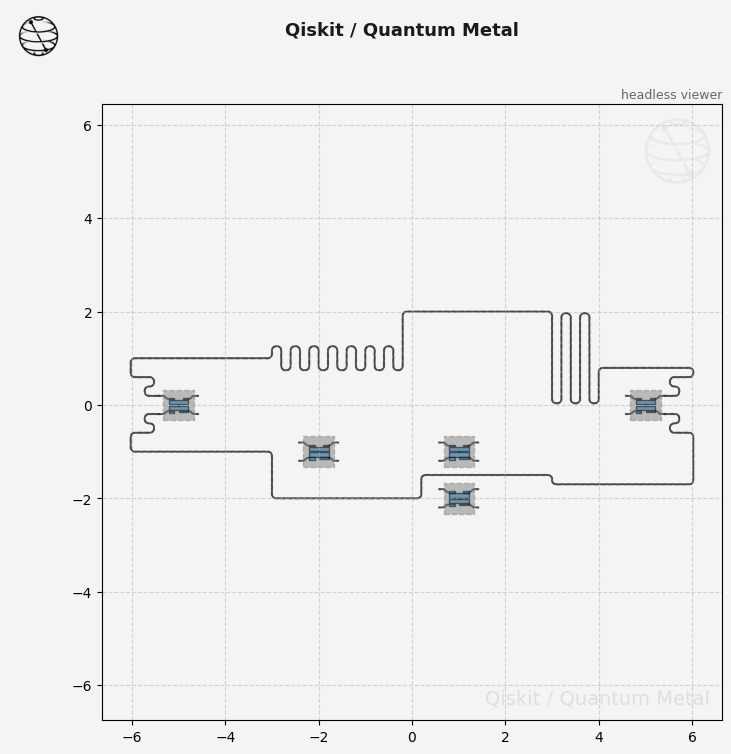
Single CPW using the pathfinder segments
[7]:
anchors = OrderedDict()
anchors[0] = np.array([-3.0, -1.0])
anchors[1] = np.array([0.2, -2])
anchors[2] = np.array([3.0, -1.7])

between_anchors = OrderedDict()  # S, M, PF
between_anchors[0] = "S"
between_anchors[1] = "S"
between_anchors[2] = "PF"
between_anchors[3] = "S"

jogsS = OrderedDict()
jogsS[0] = ["L", "200um"]
jogsS[1] = ["L", "200um"]
jogsS[2] = ["R", "200um"]
jogsS[3] = ["R", "500um"]
jogsS[4] = ["L", "200um"]

jogsE = OrderedDict()
jogsE[0] = ["R", "200um"]
jogsE[1] = ["R", "200um"]
jogsE[2] = ["L", "200um"]
jogsE[3] = ["L", "500um"]
jogsE[4] = ["R", "200um"]


optionsR = {
    "pin_inputs": {
        "start_pin": {"component": "Q0", "pin": "d"},
        "end_pin": {"component": "Q1", "pin": "c"},
    },
    "total_length": "22mm",
    "chip": "main",
    "layer": "1",
    "trace_width": "cpw_width",
    "step_size": "0.25mm",
    "anchors": anchors,
    "between_anchors": between_anchors,
    "advanced": {"avoid_collision": "true"},
    "meander": {"spacing": "200um", "asymmetry": "0um"},
    "snap": "true",
    "lead": {
        "start_straight": "0.3mm",
        "end_straight": "0.3mm",
        "start_jogged_extension": jogsS,
        "end_jogged_extension": jogsE,
    },
    **ops,
}

qb = RouteMixed(design, "line2", optionsR)

gui.rebuild()
gui.autoscale()
[7]:
<Figure size 800x800 with 2 Axes>
[8]:
# gui.screenshot()
[9]:
# create an obstacle
TransmonPocket(design, options=dict(pos_x="1.0mm", pos_y="-2.0mm", **optionsQ))
TransmonPocket(design, options=dict(pos_x="1.0mm", pos_y="-1.0mm", **optionsQ))
TransmonPocket(design, options=dict(pos_x="-2.0mm", pos_y="-1.0mm", **optionsQ))

gui.rebuild()
gui.autoscale()
[9]:
<Figure size 800x800 with 2 Axes>
[10]:
gui.screenshot()
[11]:
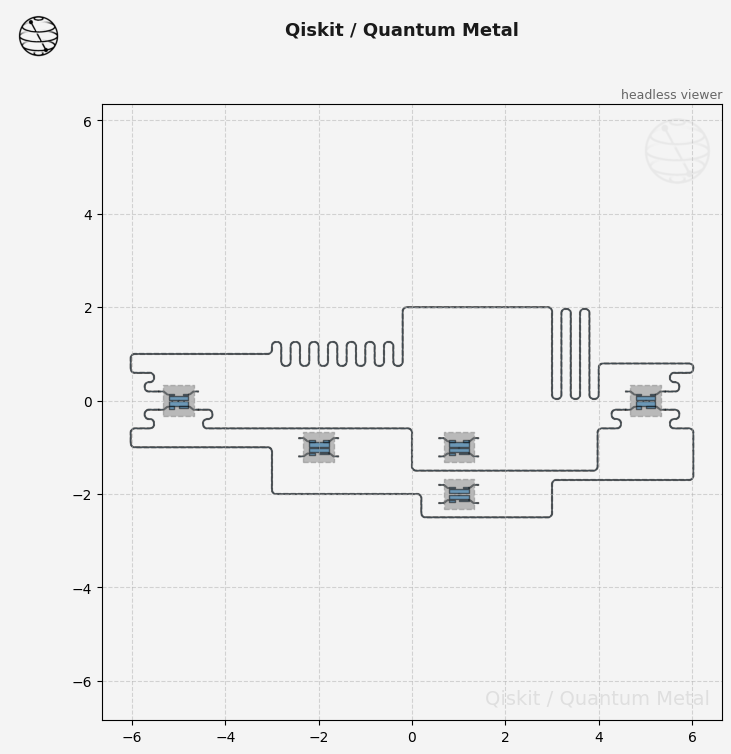
anchors = OrderedDict()
# The anchor sits between the pockets. From y = -1.5, line2 blocks the way
# right, and the pathfinder would double back over this route's first leg:
# it avoids other components, not the route it is building.
anchors[0] = np.array([0.0, -1.25])

between_anchors = OrderedDict()  # S, M, PF
between_anchors[0] = "S"
between_anchors[1] = "PF"

jogsS = OrderedDict()
jogsS[0] = ["R", "200um"]
jogsS[1] = ["R", "200um"]
jogsS[2] = ["L", "200um"]
jogsS[3] = ["L", "500um"]

jogsE = OrderedDict()
jogsE[0] = ["L", "200um"]
jogsE[1] = ["L", "200um"]
jogsE[2] = ["R", "200um"]
jogsE[3] = ["R", "500um"]

optionsR = {
    "pin_inputs": {
        "start_pin": {"component": "Q0", "pin": "c"},
        "end_pin": {"component": "Q1", "pin": "d"},
    },
    "total_length": "12mm",
    "chip": "main",
    "layer": "1",
    "trace_width": "cpw_width",
    "step_size": "0.25mm",
    "anchors": anchors,
    "between_anchors": between_anchors,
    "advanced": {"avoid_collision": "true"},
    "meander": {"spacing": "200um", "asymmetry": "0um"},
    "snap": "true",
    "lead": {
        "start_straight": "0.3mm",
        "end_straight": "0.3mm",
        "start_jogged_extension": jogsS,
        "end_jogged_extension": jogsE,
    },
    **ops,
}

qc = RouteMixed(design, "line3", optionsR)

gui.rebuild()
gui.autoscale()
[11]:
<Figure size 800x800 with 2 Axes>
[12]:
gui.screenshot()
For more information, review the Introduction to Quantum Computing and Quantum Hardware lectures below
|
Lecture Video | Lecture Notes | Lab |
|
Lecture Video | Lecture Notes | Lab |
|
Lecture Video | Lecture Notes | Lab |
|
Lecture Video | Lecture Notes | Lab |
|
Lecture Video | Lecture Notes | Lab |
|
Lecture Video | Lecture Notes | Lab |