Note
This is the documentation for the current state of the development branch of Qiskit Experiments. The documentation or APIs here can change prior to being released.
Save and load experiment data with an experiment service
Note
The cloud service at https://quantum.ibm.com/experiments has been sunset in the move to the new IBM Quantum cloud platform. Saving and loading to the cloud will not work.
Problem
You want to save and retrieve experiment data from an experiment service.
Solution
The ExperimentData supports saving and loading data with an
experiment service class satisfying the ExperimentService protocol.
Here we demonstrate with the LocalExperimentService class in Qiskit
Experiments.
Saving
Note
In the examples below, the service is instantiated with
LocalExperimentService() which only saves results to
memory. You might want to use LocalExperimentService(db_dir=db_dir)
instead specifying some local file path db_dir to save results to. Keep
in mind that LocalExperimentService was not designed to scale to
saving a large amount of data.
Saving results is done by calling ExperimentData.save():
import numpy as np
from qiskit_experiments.library import T1
from qiskit_experiments.database_service import LocalExperimentService

delays = np.arange(1.e-6, 300.e-6, 30.e-6)
exp = T1(physical_qubits=(0, ), delays=delays, backend=backend)

exp_data = exp.run().block_for_results()
service = LocalExperimentService()
exp_data.service = service
exp_data.save()
Loading
Warning
It is recommended only to load data from trusted sources. See
ExperimentEncoder for more details.
Let’s load the previous experiment again from the service. First, we create a
Provider object that has a
job(job_id) method that can return a
Job instance. Since this is a local
test, a fake provider class that just returns jobs it has been given is used.
Another provider like QiskitRuntimeService could
be used instead. Also, the provider is only needed for reloading the raw job
data for rerunning analysis. If only the experiment results and figures are
needed, the provider argument to ExperimentData.load() can be omitted.
A warning about not being able to access the job data will be emitted in this
case.
from qiskit_experiments.test.utils import FakeProvider

provider = FakeProvider()
for job in exp_data.jobs():
    provider.add_job(job)
Now the experiment data can be reloaded:
from qiskit_experiments.framework import ExperimentData
load_expdata = ExperimentData.load(exp_data.experiment_id, service=service, provider=provider)
Now we can display the figure from the loaded experiment data:
load_expdata.figure(0)
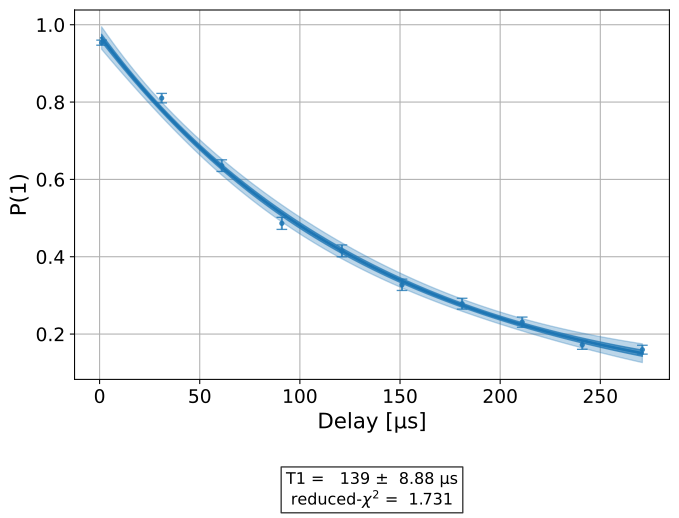
The analysis results have been retrieved as well and can be accessed normally.
load_expdata.analysis_results(dataframe=True)
| name | experiment | components | value | quality | backend | run_time | unit | chisq | |
|---|---|---|---|---|---|---|---|---|---|
| 927f9689 | T1 | T1 | [Q0] | 0.000130+/-0.000008 | good | aer_simulator_from(fake_manila) | None | s | 0.885762 |
Discussion
Note that calling save() before the experiment is complete will
instantiate an experiment entry in the database, but it will not have
complete data. To fix this, you can call save() again once the
experiment is done running.
Sometimes the metadata of an experiment can be very large and cannot be stored directly in the database.
In this case, a separate metadata.json file will be stored along with the experiment. Saving and loading
this file is done automatically in save() and load().
Auto-saving an experiment
The auto_save feature automatically saves changes to the
ExperimentData object to the experiment service whenever it’s updated.
delays = np.arange(1.e-6, 300.e-6, 30.e-6)
exp = T1(physical_qubits=(0, ), delays=delays, backend=backend)

exp_data = exp.run()
service = LocalExperimentService()
exp_data.service = service
exp_data.auto_save = True
exp_data.block_for_results()
ExperimentData(T1, 8e88c9f8-4ccc-40d2-996f-9c9a9c025591, job_ids=['9f0578c6-7ade-448d-8f9d-21bd6f1dc3f1'], metadata=<5 items>, figure_names=['T1_Q0_8e88c9f8.svg'])
Setting auto_save = True works by triggering ExperimentData.save()
once the experiment’s analysis completes.
When working with composite experiments, setting auto_save will propagate this
setting to the child experiments.
Deleting an experiment
Both figures and analysis results can be deleted. Note that unless you
have auto save on, the update has to be manually saved to the
database by calling save(). Because there are two analysis
results, one for the T1 parameter and one for the curve fitting results, we must
delete twice to fully remove the analysis results.
t1_expdata.delete_figure(0)
t1_expdata.delete_analysis_result(0)
t1_expdata.delete_analysis_result(0)
Tagging experiments
Tags and notes can be added to experiments to help identify specific experiments in the interface. For example, an experiment can be tagged with the following code.
t1_expdata.tags = ['tag1', 'tag2']
t1_expdata.notes = "Example note."