Create Your QCSC Workflow with Prefect for Local Slurm
This hands-on tutorial guides you through running the BitCount demo on a local
Slurm cluster built with
slurm-docker-cluster.
The controller and worker nodes run inside Docker on your Mac, while the
workflow itself still uses the same qcsc-prefect flow and MPI executable
assets as the Miyabi and Fugaku tutorials.
Our objective is to compute a count dictionary of sampler bitstrings using MPI programming on the QCSC architecture.
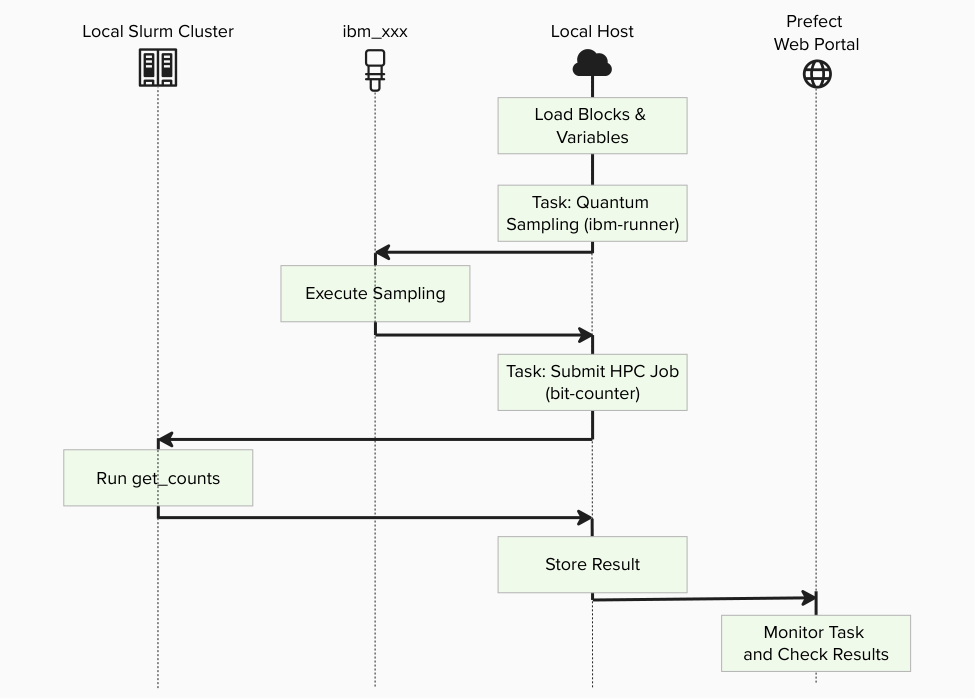
Key principles in this tutorial:
- Users do not write new Python flow code for BitCount
- The same
flow_optimized.pyentrypoint is reused on Slurm - The current
create_blocks.pyhelper does not yet generate Slurm assets, so we create the required Prefect blocks manually - For the packaged Open MPI used in this local cluster,
mpirunis used inside the Slurm allocation for MPI jobs
Prefect Core Concepts
You will see these terms:
- Flow: the end-to-end workflow entrypoint
examples/prefect_bitcount_demo/flow_optimized.py- Task: individual units executed inside a flow
quantum-sampling-taskinflow_optimized.pyhpc-bitcount-taskinflow_optimized.py- Block: reusable server-side configuration stored in Prefect
CommandBlock:cmd-bitcount-histExecutionProfileBlock:exec-bitcount-slurmHPCProfileBlock:hpc-slurm-bitcount- Variable: server-side runtime parameters
slurm-bitcount-options
What you need
- A Mac with Docker and Docker Compose
- A local checkout of
qcsc-prefect - A reachable Prefect backend from inside the
slurmctldcontainer - A running local Slurm cluster created from
slurm-docker-cluster
If you want to run against IBM Quantum Runtime later, you will also need:
- a configured
QuantumRuntimeblock such asibm-runner - IBM Quantum credentials set up in the Prefect backend you use
Prerequisites
Before starting, make sure:
- You have completed
How to Test Slurm Locally with
slurm-docker-clusterthrough Step 3. sinfoinsideslurmctldshows at least two CPU workers, for examplec1andc2.- You know the Slurm partition name shown by
sinfo, such ascpuornormal.
[!IMPORTANT] All commands below run inside the
slurmctldcontainer unless a step explicitly says "from the host machine".
Existing files used in this tutorial
../../examples/prefect_bitcount_demo/src/get_counts_hist.cpp../../examples/prefect_bitcount_demo/flow_optimized.py../../examples/prefect_bitcount_demo/quantum_sampling.py../../packages/qcsc-prefect-blocks/src/qcsc_prefect_blocks/common/blocks.py
All steps below use these files as-is.
Create BitCount Workflow on Local Slurm
Step 1. Log in to Prefect Cloud
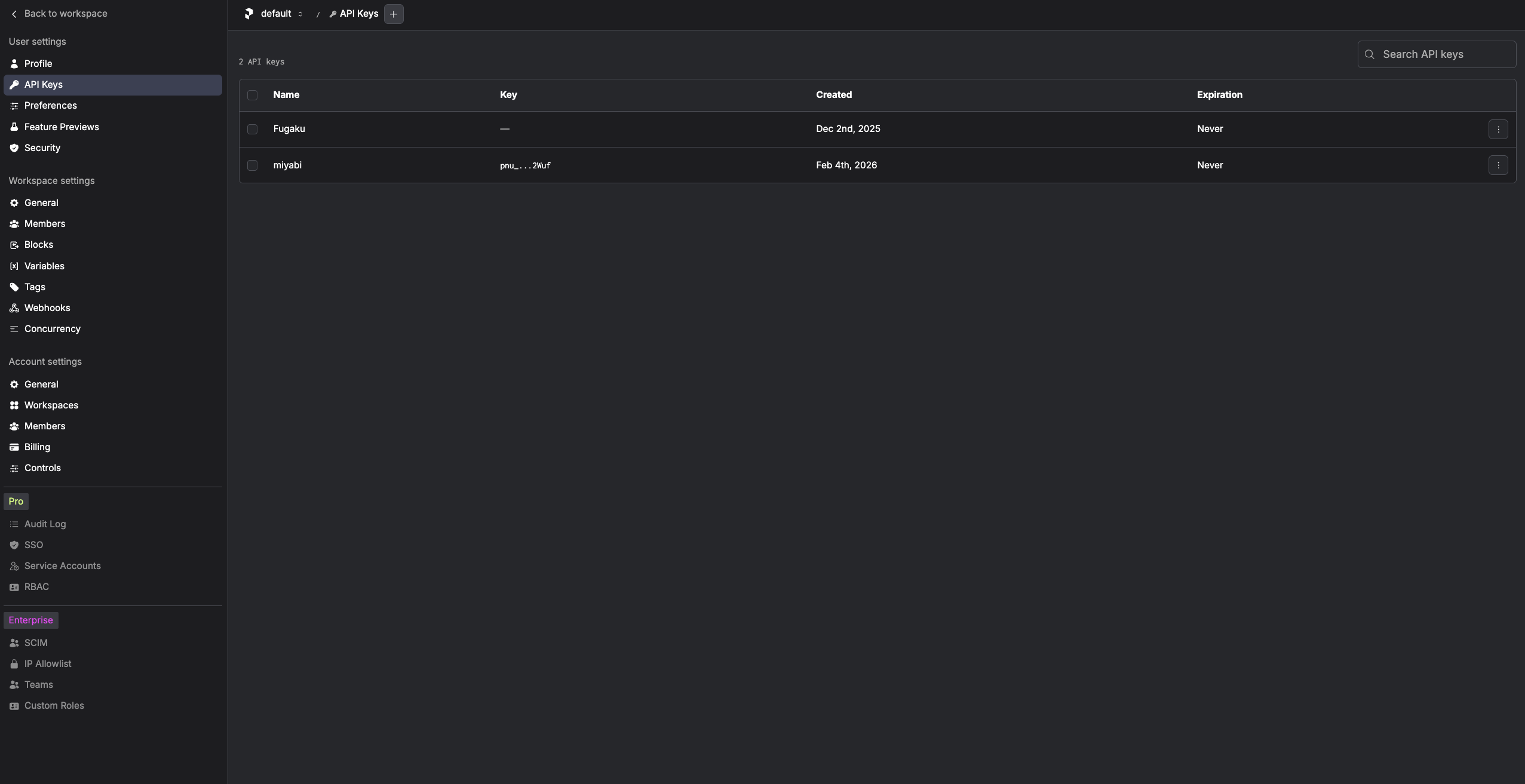
Open Prefect Cloud in your browser and create an API key from Profile Settings -> API Keys:
https://app.prefect.cloud
Open a shell in the controller and activate the virtual environment:

docker exec -it slurmctld bash

cd /data/qcsc-prefect
. .venv/bin/activate
Create and switch to a dedicated Prefect profile for the local Slurm tutorial:
prefect profile create cloud-slurm-local
prefect profile use cloud-slurm-local
Log in to your Prefect Cloud workspace:
prefect cloud login --key "<PREFECT_API_KEY>"
Check the current configuration:
prefect config view
Expected values include:
PREFECT_PROFILE='cloud-slurm-local'
PREFECT_API_URL='https://api.prefect.cloud/api/accounts/.../workspaces/...'
[!NOTE] The Prefect blocks and variable created later in this tutorial are stored in the currently selected Prefect Cloud workspace.
Step 2. Install local dependencies
From the host machine, install MPI build/runtime packages on the controller and all worker containers:
for n in slurmctld slurm-cpu-worker-1 slurm-cpu-worker-2; do
  docker exec "$n" bash -lc '
    if command -v dnf >/dev/null 2>&1; then
      dnf install -y gcc gcc-c++ openmpi openmpi-devel
    else
      yum install -y gcc gcc-c++ openmpi openmpi-devel
    fi
  '
done
If you already opened a controller shell in Step 1, keep using it. Otherwise, open a shell in the controller:
docker exec -it slurmctld bash
cd /data/qcsc-prefect
. .venv/bin/activate
Install Python packages required by the BitCount flow:
python -m pip install prefect-qiskit qiskit
[!NOTE] Even when
--quantum-source randomis used, the current implementation still importsprefect_qiskitandqiskit, so both packages must be installed in the controller virtual environment.
Step 3. Build the MPI executable
Prepare the Open MPI toolchain in the controller shell:
source /etc/profile.d/modules.sh 2>/dev/null || true
module load mpi/openmpi-x86_64 2>/dev/null || true
export PATH=/usr/lib64/openmpi/bin:$PATH
export LD_LIBRARY_PATH=/usr/lib64/openmpi/lib:${LD_LIBRARY_PATH:-}
Compile the optimized BitCount executable:
mkdir -p examples/prefect_bitcount_demo/bin
mpicxx -O3 -std=c++17 \
  -o examples/prefect_bitcount_demo/bin/get_counts_hist \
  examples/prefect_bitcount_demo/src/get_counts_hist.cpp
Confirm the executable path:
realpath examples/prefect_bitcount_demo/bin/get_counts_hist
Example output:
/data/qcsc-prefect/examples/prefect_bitcount_demo/bin/get_counts_hist
Step 4. Create the Prefect blocks for Slurm
The current helper script examples/prefect_bitcount_demo/create_blocks.py
supports miyabi and fugaku, but not slurm yet. For the local Slurm
tutorial, create the blocks directly from Python.
Run the following in the controller shell. Replace queue_cpu="cpu" with the
partition name you saw in sinfo if your cluster uses a different name.
python - <<'PY'
from qcsc_prefect_blocks.common.blocks import CommandBlock, ExecutionProfileBlock, HPCProfileBlock

for cls in (CommandBlock, ExecutionProfileBlock, HPCProfileBlock):
    register = getattr(cls, "register_type_and_schema", None)
    if callable(register):
        register()

CommandBlock(
    command_name="bitcount-hist",
    executable_key="bitcount_hist",
    description="Optimized bitcount executable (binary histogram output)",
    default_args=[],
).save("cmd-bitcount-hist", overwrite=True)

ExecutionProfileBlock(
    profile_name="bitcount-slurm",
    command_name="bitcount-hist",
    resource_class="cpu",
    num_nodes=2,
    mpiprocs=1,
    ompthreads=1,
    walltime="00:05:00",
    launcher="mpirun",
    mpi_options=["--allow-run-as-root"],
    modules=[],
    pre_commands=[
        "source /etc/profile.d/modules.sh 2>/dev/null || true",
        "module load mpi/openmpi-x86_64 2>/dev/null || true",
        "export PATH=/usr/lib64/openmpi/bin:$PATH",
        "export LD_LIBRARY_PATH=/usr/lib64/openmpi/lib:${LD_LIBRARY_PATH:-}",
    ],
    environments={
        "OMPI_MCA_pml": "ob1",
        "OMPI_MCA_btl": "tcp,self",
    },
).save("exec-bitcount-slurm", overwrite=True)

HPCProfileBlock(
    hpc_target="slurm",
    queue_cpu="cpu",
    queue_gpu="cpu",
    project_cpu="",
    project_gpu="",
    executable_map={
        "bitcount_hist": "/data/qcsc-prefect/examples/prefect_bitcount_demo/bin/get_counts_hist"
    },
).save("hpc-slurm-bitcount", overwrite=True)

print("saved blocks: cmd-bitcount-hist / exec-bitcount-slurm / hpc-slurm-bitcount")
PY
Create the variable used by flow_optimized.py:
prefect variable set slurm-bitcount-options \
  '{"sampler_options":{"params":{"shots":100000}},"work_dir":"/data/qcsc-prefect/work/bitcount_slurm"}' \
  --overwrite
Step 4.1. What this creates
| Type | Name | Purpose |
|---|---|---|
| CommandBlock | cmd-bitcount-hist |
Command definition (executable_key=bitcount_hist) |
| ExecutionProfileBlock | exec-bitcount-slurm |
Nodes, launcher, MPI environment, walltime |
| HPCProfileBlock | hpc-slurm-bitcount |
Slurm partition and executable path |
| Prefect Variable | slurm-bitcount-options |
Sampler options and base work directory |
Step 5. Run the optimized flow
For local validation, start with deterministic random bitstrings:
python examples/prefect_bitcount_demo/flow_optimized.py \
  --quantum-source random \
  --command-block cmd-bitcount-hist \
  --execution-profile-block exec-bitcount-slurm \
  --hpc-profile-block hpc-slurm-bitcount \
  --options-variable slurm-bitcount-options \
  --work-dir /data/qcsc-prefect/work/bitcount_slurm \
  --script-filename bitcount_optimized
Expected final output is a Python dictionary like:
{'mode': 'optimized', 'job_id': '123', 'shots': 100000, 'num_unique_bitstrings': 1024, 'work_dir': '/data/qcsc-prefect/work/bitcount_slurm/job_...'}
[!NOTE] After
quantum-sampling-taskfinishes, Prefect may not print additional logs for a while. This is expected: the Slurm runtime submits the job withsbatch, then pollssacctuntil the job reaches a terminal state.
In another controller shell, you can watch the job directly:
squeue
sacct
latest="$(ls -td /data/qcsc-prefect/work/bitcount_slurm/job_* | head -n 1)"
tail -f "$latest/output.out" "$latest/output.err"
Step 6. Verify the output files
Inspect the generated working directory:
latest="$(ls -td /data/qcsc-prefect/work/bitcount_slurm/job_* | head -n 1)"
echo "$latest"
ls -l "$latest"
cat "$latest/output.out"
cat "$latest/output.err"
You should see files such as:
input.binhist_u64.binbitcount_optimized.slurmoutput.outoutput.err
output.err should usually be empty.
Step 7. Optional: switch to IBM Quantum Runtime
Once the local Slurm path works in random mode, you can switch the same flow
to a real backend by changing only the quantum-source arguments.
Make sure a QuantumRuntime block such as ibm-runner already exists in the
same Prefect backend, then run:
python examples/prefect_bitcount_demo/flow_optimized.py \
  --quantum-source real-device \
  --runtime-block ibm-runner \
  --command-block cmd-bitcount-hist \
  --execution-profile-block exec-bitcount-slurm \
  --hpc-profile-block hpc-slurm-bitcount \
  --options-variable slurm-bitcount-options \
  --work-dir /data/qcsc-prefect/work/bitcount_slurm \
  --script-filename bitcount_optimized
Troubleshooting
sinfo shows only c1
Scale the CPU workers from the host machine:
cd slurm-docker-cluster
make scale-cpu-workers N=2
make status
sbatch: invalid partition specified
Use the exact partition name shown by sinfo in the HPCProfileBlock
configuration, for example cpu instead of normal.
mpicxx or mpirun is missing
Install gcc, gcc-c++, openmpi, and openmpi-devel on slurmctld,
c1, and c2.
Open MPI fails with PMI / PMIx errors under srun
For the local cluster in this tutorial, use launcher="mpirun" inside the
Slurm allocation instead of launcher="srun".
Open MPI warns about peer connections or hangs between c1 and c2
Do not set OMPI_MCA_btl_tcp_if_include=lo for the multi-node Slurm run. That
setting restricts communication to each container's loopback interface and
breaks inter-node MPI traffic.