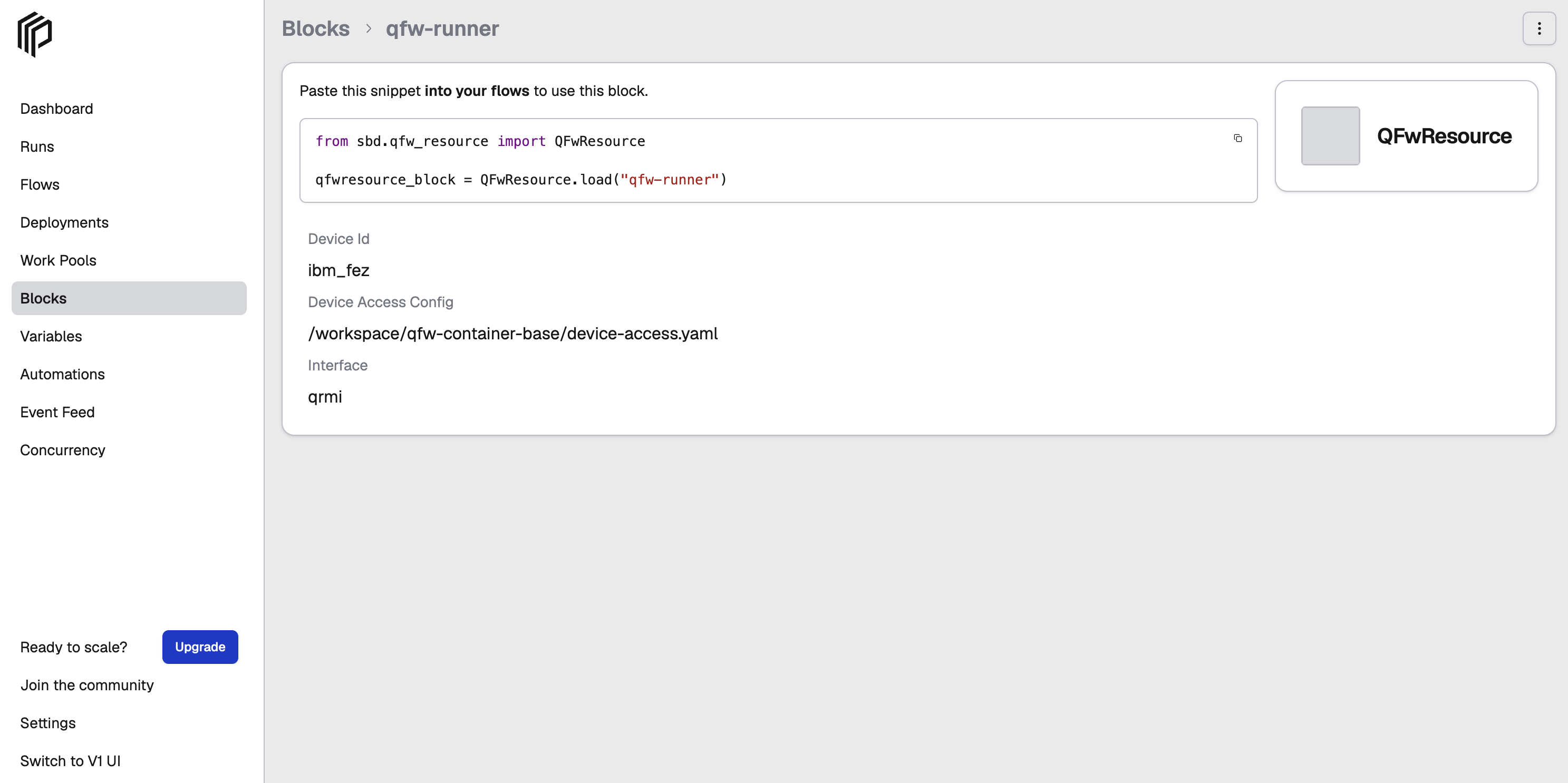
Create and Register a QFw Resource Block
The QFwResource Prefect block stores the configuration needed to access a quantum device through QFw.
Use this Block as the resource referenced by a QuantumSourceBlock whose
config.kind is "qfw" and config.block_name is "qfw-runner". The SQD
quantum_source parameter is the source Block's document name, not a platform
selector. See Quantum Sources.
1. Prerequisites
Before creating the QFwResource block:
- The QFw-SLURM container environment must be running.
- QFw and QRMI must already be configured for the target quantum device.
- The QFw device-access configuration and provider credentials must be available in the QFw-SLURM environment.
- A Prefect server must be running and the active Prefect profile must point to that server.
- The
qcsc-prefectrepository must be available in the active QFw-SLURM environment.
For QFw device and provider credential setup, see the QFw device configuration.
For Prefect server setup in the QFw-SLURM environment, see How to Run and Access a Prefect Server on a Slurm Login Node.
2. Register the QFw Resource Block Type
The QFwResource block contains the information needed to locate and access a QFw device resource.
The block is part of the qcsc-prefect-qiskit package:
/path/to/qcsc-prefect/packages/qcsc-prefect-qiskit/src/qcsc_prefect/integrations/qiskit/sources/qfw_resource.py
The former import path sbd.qfw_resource.QFwResource still works and gives the same
class, so saved qfwresource blocks keep loading.
Register the block type with Prefect:
python - <<'PY'
from qcsc_prefect.integrations.qiskit.sources import QFwResource

QFwResource.register_type_and_schema()
print("QFwResource registered")
PY
A successful registration prints:
QFwResource registered
Verify that the block type is registered:
prefect block type ls | grep -i qfw
The output should include QFwResource.
Note
Importing or loading
QFwResourcedoes not import QFw or DEFw: they are imported only by the block's QFw methods, such asrun_circuit. This matters because DEFw installs signal handlers on import, which Python allows only in the main thread, while Prefect loads block files and runs tasks in worker threads. The block can therefore be registered withprefect block register -m qcsc_prefect.integrations.qiskit.sourcesas well as with the Python snippet above. The module command registers bothQFwResourceand the commonQuantumSourceBlock; the Python snippet registers onlyQFwResource. Do not call its QFw methods from a worker thread; the SQD workflow uses only the saveddevice_id, throughQFwSource.
QFwResource.run_sampleris deprecated: it filters the shots inside the block and loses leading zeros. UseQFwSource, which returns every register, and filter in the application. See Quantum Sources.
3. Create the QFw Resource Block Instance
Create the qfw-runner block instance by specifying the QFw device ID and the device-access configuration file.
From the qcsc-prefect repository root, run:
python algorithms/closed_loop/sqd_de/create_qfw_block.py \
  --device-id <device-id> \
  --device-access-config <path-to-device-access.yaml>
For example:
python algorithms/closed_loop/sqd_de/create_qfw_block.py \
  --device-id ibm_fez \
  --device-access-config /workspace/qfw-container-base/device-access.yaml
The value passed to --device-id must correspond to a device configured under qpus in the specified device-access.yaml file.
If --device-access-config is omitted, the script uses the following default path:
/workspace/qfw-container-base/device-access.yaml
For example, when using the default configuration path:
python algorithms/closed_loop/sqd_de/create_qfw_block.py \
  --device-id ibm_fez
A successful creation prints output similar to:
Created QFwResource block: qfw-runner
Device ID: ibm_fez
The created block uses the QRMI interface for QFw device access and quantum execution.
4. Verify the Block Instance
Check that the named block instance was created:
prefect block ls
qfw-runner:
                                           Blocks
┏━━━━━━━━━━━━━━━━━━━━━━━━━━━━━━━━━━━━━━┳━━━━━━━━━━━━━┳━━━━━━━━━━━━┳━━━━━━━━━━━━━━━━━━━━━━━━┓
┃ ID                                   ┃ Type        ┃ Name       ┃ Slug                   ┃
┡━━━━━━━━━━━━━━━━━━━━━━━━━━━━━━━━━━━━━━╇━━━━━━━━━━━━━╇━━━━━━━━━━━━╇━━━━━━━━━━━━━━━━━━━━━━━━┩
│ <block_id>                           │ QFwResource │ qfw-runner │ qfwresource/qfw-runner │
└──────────────────────────────────────┴─────────────┴────────────┴────────────────────────┘
Inspect the block instance:
prefect block inspect qfwresource/qfw-runner
The output should look similar to:
                                                        qfwresource/qfw-runner
┌─────────────────────────────────────────┬──────────────────────────────────────────────────────────────────────────────────────────┐
│ Block Type                              │ QFwResource                                                                              │
│ Block id                                │ <block_id>                                                                               │
├─────────────────────────────────────────┼──────────────────────────────────────────────────────────────────────────────────────────┤
│ device_id                               │ ibm_fez                                                                                  │
│ device_access_config                    │ /workspace/qfw-container-base/device-access.yaml                                         │
│ interface                               │ qrmi                                                                                     │
└─────────────────────────────────────────┴──────────────────────────────────────────────────────────────────────────────────────────┘
The block details should show the configured device ID, device-access configuration path and interface.
You can also view and edit the block configuration from the Prefect UI under Blocks.