Introduction to qiskit-pasqal-provider
[1]:
import os
from copy import deepcopy

import numpy as np
import matplotlib.pyplot as plt

from pulser import Pulse, Sequence, InterpolatedWaveform, AnalogDevice
from pulser_simulation import QutipEmulator

# define user config
user = os.environ.get("PASQAL_ID", None)
psswd = os.environ.get("PASQAL_CLOUD_PASSWORD", None)
project_id = os.environ.get("PASQAL_QISKIT_PROJECT_ID", None)
QPP
qiskit-pasqal-provider (QPP) is way for Qiskit users to program Pasqal’s analog neutral atoms devices.
2. Build circuits with analog gate
2.1 HamiltonianGate
The analog gate, HamiltonianGate, is defined by the following parameters:
amplitude:InterpolatePointsdetuning:InterpolatePointsphase:float,qiskit’sParameterExpressionorInterpolatePointscoords: any value pair array-like datagrid_transform: one of the followingLiteral:"triangular","rectangular"or"square"
2.2 InterpolatePoints
It is a class to create interpolate points given an array of values (literal or parametrized)
[2]:
from qiskit_pasqal_provider.providers.pulse_utils import InterpolatePoints
[3]:
# literal

ampl1 = InterpolatePoints(duration=1000, values=[1, 1, 1, 1])

print(f"\n- {ampl1.values=}\n\n- {ampl1.duration=}\n")
- ampl1.values=[1, 1, 1, 1]

- ampl1.duration=1000
[4]:
# parametrized

from qiskit.circuit import Parameter


p = Parameter("p")
t = Parameter("t")

ampl2 = InterpolatePoints(duration=t, values=p, n=4)

print(f"\n- {ampl2.values=}\n\n- {ampl2.duration=}\n")
- ampl2.values=[Parameter(p), Parameter(p), Parameter(p), Parameter(p)]

- ampl2.duration=Parameter(t)
2.3 Defining the coordinates
The coords argument should be look like a 2D- or 3D-point tuple array.
[5]:
# valid coords

coords1 = [(0, 0), (0, 1), (1, 0), (1, 1)]
coords2 = [(0, 0, 0), (0, 1, 0), (1, 0, 1), (1, 1, 0)]
[6]:
# invalid coords

coords3 = []
coords4 = [(0,), (1,), (2,), (3,)]
Note: coords data will be validated inside the HamiltonianGate. An error will raise if they do not comply with pulser.Register requirements.
2.4 Building the gate
[7]:
from qiskit_pasqal_provider.providers.gate import HamiltonianGate
[8]:
ampl = InterpolatePoints(duration=1000, values=[1, 1, 1, 1])
det = InterpolatePoints(duration=1000, values=[0, 1 / 3, 2 / 3, 1])
phase = 0.0


hg = HamiltonianGate(
    amplitude=ampl, detuning=det, phase=phase, coords=coords1, transform=True
)

print(hg)
Instruction(name='HG', num_qubits=4, num_clbits=0, params=[])
Important remarks:
HamiltonianGateis just like any otherqiskitgate in the sense that is composible by anInstructioninstance and can be placed inside theQuantumCircuit.The number of qubits are defined by the length of the
coordsargument.When working with analog gate, only one gate can be placed inside the given
QuantumCircuit, may it be analog or not.
2.5 Defining the QuantumCircuit
A circuit can be built as any other qiskit circuit:
[9]:
from qiskit.circuit import QuantumCircuit
[10]:
# define the size of the circuit according to the coords1 used on HamiltonianGate above

qc1 = QuantumCircuit(len(coords1))
then, append the gate to the defined qc circuit:
[11]:
qc1.append(hg, qc1.qubits)
[11]:
<qiskit.circuit.instructionset.InstructionSet at 0x7f3a81bf3040>
remarks:
Given the nature of
qiskitcircuits, when appending a new gate, you need to define the number of qubits.We always use the total number of the qubits given by the coordinates and defined in the
QuantumCircuit, which is also stored inQuantumCircuit.qubitsproperty
[12]:
qc1.draw() # not very exciting, I know
[12]:
     ┌─────┐
q_0: ┤0    ├
     │     │
q_1: ┤1    ├
     │  Hg │
q_2: ┤2    ├
     │     │
q_3: ┤3    ├
     └─────┘
Important remarks:
In this analog gate configuration, the actual register (for
pulserpurposes) sits inside theHamiltonianGate, not in theQuantumCircuit.The whole dynamics of your algorithm must be done inside the single
HamiltonianGate, throughInterpolatePointsfunctions.
2.5.1 Parametrized QuantumCircuit
It is possible to do parametrized circuits as well:
[13]:
p = Parameter("p")
d = Parameter("d")

ampl2 = InterpolatePoints(duration=1000, values=p, n=4)
det2 = InterpolatePoints(duration=1000, values=d, n=4)

hg2 = HamiltonianGate(amplitude=ampl2, detuning=det2, phase=phase, coords=coords1)

qc2 = QuantumCircuit(len(coords1))
qc2.append(hg2, qc2.qubits)
qc2.draw()  # at least it shows the parameters
[13]:
     ┌──────────┐
q_0: ┤0         ├
     │          │
q_1: ┤1         ├
     │  Hg(p,d) │
q_2: ┤2         ├
     │          │
q_3: ┤3         ├
     └──────────┘
3. Create and run a simple program
Now, following the qiskit formula, we can create and run a program using our analog gate
First, defining the coordinates and drawing how the register will look like
[14]:
from pulser import Register
[15]:
coords = [[0, 0], [3, 5.2], [6, 0], [9, -5.2], [9, 5.2], [12, 0]]

# With a blockade radius of 8.7
blockade_radius = 8.7
[16]:
# show graph
reg = Register.from_coordinates(coords)
reg.draw(blockade_radius=blockade_radius)
/home/runner/work/qiskit-pasqal-provider/qiskit-pasqal-provider/.tox/docs/lib/python3.12/site-packages/pulser/register/register.py:58: DeprecationWarning: Usage of `int`s or any non-`str`types as `QubitId`s will be deprecated. Define your `QubitId`s as `str`s, prefer setting `prefix='q'` when using classmethods, as that will become the new default once `int` qubit IDs become invalid.
  super().__init__(qubits, **kwargs)
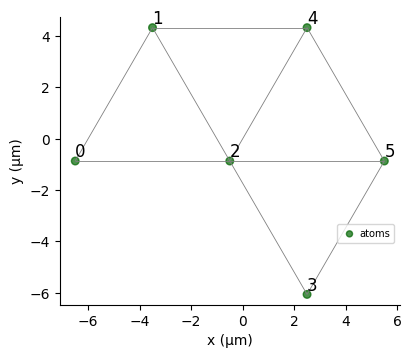
By default, a layout is filled according to the coordinates and the requirements given by the provider instance.
But it can be defined explicitly by the user:
[17]:
from qiskit_pasqal_provider.providers.target import PasqalTarget
[18]:
target = PasqalTarget(layout=None)
If layout argument is none (default), the backend will perform a register.with_automatic_layout() call.
For more information, request access to the qiskit-pasqal-provider repository.
[19]:
from qiskit_pasqal_provider.providers.gate import InterpolatePoints, HamiltonianGate
[20]:
# Calculate interaction strength between nearest-neighbours
interaction = 5420158.53 / blockade_radius**6

# Set up an adiabatic pulse
times = [0, 0.2, 0.8, 1]
ampl = InterpolatePoints(values=[0, 4, 4, 0], times=times)
det = InterpolatePoints(
    values=[-10, -10, interaction / 2, interaction / 2],
    times=times,
)
phase = 0.0
[21]:
# analog gate
gate = HamiltonianGate(ampl, det, phase, coords, grid_transform="triangular")

# qiskit circuit with analog gate
qc = QuantumCircuit(len(coords))
qc.append(gate, qc.qubits)
[21]:
<qiskit.circuit.instructionset.InstructionSet at 0x7f3a7cb95180>
3.1 Running on pure pulser for comparison
Utilizing the code above for pulser
[22]:
ampl_p = InterpolatedWaveform(1000, [0, 4, 4, 0], times=times)
det_p = InterpolatedWaveform(
    1000, [-10, -10, interaction / 2, interaction / 2], times=times
)
phase_p = 0.0

pulse = Pulse(ampl_p, det_p, phase_p)

seq = Sequence(reg, AnalogDevice)
seq.declare_channel("rydberg_global", "rydberg_global")
seq.add(pulse, "rydberg_global")
bkd = QutipEmulator.from_sequence(seq)
results = bkd.run()

pulser_res = results.sample_final_state()
[23]:
from qiskit_pasqal_provider.providers.provider import PasqalProvider
from qiskit_pasqal_provider.providers.sampler import SamplerV2
3.2 Running examples on different devices
Following qiskit convention, a provider consists in the service that contains the backend, target (device) and additional information, such as remote configuration.
There is two possible ways to execute a circuit and extract results from it: estimator and sampler. QPP only uses sampler approach for now.
From the sampler object, it is possible to run a circuit and get its results as qiskit result object.
To retrieve the counts, just use result[0].data.counts.
3.2.1 Local emulator: QuTip
[24]:
qc_qutip = deepcopy(qc)

provider_qutip = PasqalProvider()
backend_qutip = provider_qutip.get_backend("qutip")
sampler_qutip = SamplerV2(backend_qutip)
results_qutip = sampler_qutip.run([qc_qutip], shots=2000).result()

res_qutip = results_qutip[0].data.counts
3.2.2 Local emulator: Emu-MPS
[25]:
qc_mps = deepcopy(qc)

provider_mps = PasqalProvider()
backend_mps = provider_mps.get_backend("emu-mps")
sampler_mps = SamplerV2(backend_mps)
results_mps = sampler_mps.run([qc_mps], shots=2000).result()

res_mps = results_mps[0].data.counts
step = 1/100, χ = 1, |ψ| = 0.000 MB, RSS = 796.320 MB, Δt = 0.087 s
step = 2/100, χ = 1, |ψ| = 0.000 MB, RSS = 796.320 MB, Δt = 0.025 s
step = 3/100, χ = 1, |ψ| = 0.000 MB, RSS = 796.320 MB, Δt = 0.025 s
step = 4/100, χ = 2, |ψ| = 0.000 MB, RSS = 796.320 MB, Δt = 0.026 s
step = 5/100, χ = 3, |ψ| = 0.001 MB, RSS = 796.320 MB, Δt = 0.036 s
step = 6/100, χ = 3, |ψ| = 0.001 MB, RSS = 796.320 MB, Δt = 0.039 s
step = 7/100, χ = 3, |ψ| = 0.001 MB, RSS = 796.320 MB, Δt = 0.039 s
step = 8/100, χ = 3, |ψ| = 0.001 MB, RSS = 796.320 MB, Δt = 0.040 s
step = 9/100, χ = 3, |ψ| = 0.001 MB, RSS = 796.320 MB, Δt = 0.040 s
step = 10/100, χ = 3, |ψ| = 0.001 MB, RSS = 796.320 MB, Δt = 0.041 s
step = 11/100, χ = 3, |ψ| = 0.001 MB, RSS = 796.320 MB, Δt = 0.040 s
step = 12/100, χ = 4, |ψ| = 0.001 MB, RSS = 796.320 MB, Δt = 0.040 s
step = 13/100, χ = 4, |ψ| = 0.001 MB, RSS = 796.320 MB, Δt = 0.040 s
step = 14/100, χ = 4, |ψ| = 0.001 MB, RSS = 796.320 MB, Δt = 0.040 s
step = 15/100, χ = 5, |ψ| = 0.001 MB, RSS = 796.320 MB, Δt = 0.040 s
step = 16/100, χ = 5, |ψ| = 0.002 MB, RSS = 796.320 MB, Δt = 0.042 s
step = 17/100, χ = 5, |ψ| = 0.002 MB, RSS = 796.320 MB, Δt = 0.043 s
step = 18/100, χ = 5, |ψ| = 0.002 MB, RSS = 796.320 MB, Δt = 0.041 s
step = 19/100, χ = 5, |ψ| = 0.002 MB, RSS = 796.320 MB, Δt = 0.042 s
step = 20/100, χ = 5, |ψ| = 0.002 MB, RSS = 796.320 MB, Δt = 0.040 s
step = 21/100, χ = 6, |ψ| = 0.002 MB, RSS = 796.320 MB, Δt = 0.040 s
step = 22/100, χ = 6, |ψ| = 0.002 MB, RSS = 796.320 MB, Δt = 0.040 s
step = 23/100, χ = 6, |ψ| = 0.002 MB, RSS = 796.320 MB, Δt = 0.040 s
step = 24/100, χ = 6, |ψ| = 0.002 MB, RSS = 796.320 MB, Δt = 0.040 s
step = 25/100, χ = 6, |ψ| = 0.002 MB, RSS = 796.320 MB, Δt = 0.040 s
step = 26/100, χ = 6, |ψ| = 0.002 MB, RSS = 796.320 MB, Δt = 0.040 s
step = 27/100, χ = 7, |ψ| = 0.002 MB, RSS = 796.320 MB, Δt = 0.040 s
step = 28/100, χ = 7, |ψ| = 0.002 MB, RSS = 796.320 MB, Δt = 0.040 s
step = 29/100, χ = 7, |ψ| = 0.002 MB, RSS = 796.320 MB, Δt = 0.040 s
step = 30/100, χ = 7, |ψ| = 0.002 MB, RSS = 796.320 MB, Δt = 0.040 s
step = 31/100, χ = 7, |ψ| = 0.002 MB, RSS = 796.320 MB, Δt = 0.040 s
step = 32/100, χ = 7, |ψ| = 0.002 MB, RSS = 796.320 MB, Δt = 0.043 s
step = 33/100, χ = 7, |ψ| = 0.002 MB, RSS = 796.320 MB, Δt = 0.051 s
step = 34/100, χ = 7, |ψ| = 0.002 MB, RSS = 796.320 MB, Δt = 0.041 s
step = 35/100, χ = 7, |ψ| = 0.002 MB, RSS = 796.320 MB, Δt = 0.040 s
step = 36/100, χ = 7, |ψ| = 0.002 MB, RSS = 796.320 MB, Δt = 0.041 s
step = 37/100, χ = 7, |ψ| = 0.002 MB, RSS = 796.320 MB, Δt = 0.040 s
step = 38/100, χ = 7, |ψ| = 0.002 MB, RSS = 796.320 MB, Δt = 0.040 s
step = 39/100, χ = 7, |ψ| = 0.002 MB, RSS = 796.320 MB, Δt = 0.040 s
step = 40/100, χ = 7, |ψ| = 0.002 MB, RSS = 796.320 MB, Δt = 0.040 s
step = 41/100, χ = 7, |ψ| = 0.002 MB, RSS = 796.320 MB, Δt = 0.041 s
step = 42/100, χ = 7, |ψ| = 0.002 MB, RSS = 796.320 MB, Δt = 0.040 s
step = 43/100, χ = 7, |ψ| = 0.002 MB, RSS = 796.320 MB, Δt = 0.040 s
step = 44/100, χ = 7, |ψ| = 0.002 MB, RSS = 796.320 MB, Δt = 0.040 s
step = 45/100, χ = 7, |ψ| = 0.002 MB, RSS = 796.320 MB, Δt = 0.040 s
step = 46/100, χ = 7, |ψ| = 0.002 MB, RSS = 796.320 MB, Δt = 0.040 s
step = 47/100, χ = 7, |ψ| = 0.002 MB, RSS = 796.320 MB, Δt = 0.039 s
step = 48/100, χ = 7, |ψ| = 0.002 MB, RSS = 796.320 MB, Δt = 0.040 s
step = 49/100, χ = 7, |ψ| = 0.002 MB, RSS = 796.320 MB, Δt = 0.037 s
step = 50/100, χ = 7, |ψ| = 0.002 MB, RSS = 796.320 MB, Δt = 0.037 s
step = 51/100, χ = 7, |ψ| = 0.002 MB, RSS = 796.320 MB, Δt = 0.037 s
step = 52/100, χ = 7, |ψ| = 0.002 MB, RSS = 796.320 MB, Δt = 0.037 s
step = 53/100, χ = 7, |ψ| = 0.002 MB, RSS = 796.320 MB, Δt = 0.037 s
step = 54/100, χ = 7, |ψ| = 0.002 MB, RSS = 796.320 MB, Δt = 0.037 s
step = 55/100, χ = 7, |ψ| = 0.002 MB, RSS = 796.320 MB, Δt = 0.037 s
step = 56/100, χ = 7, |ψ| = 0.002 MB, RSS = 796.320 MB, Δt = 0.037 s
step = 57/100, χ = 7, |ψ| = 0.002 MB, RSS = 796.320 MB, Δt = 0.031 s
step = 58/100, χ = 7, |ψ| = 0.002 MB, RSS = 796.320 MB, Δt = 0.032 s
step = 59/100, χ = 7, |ψ| = 0.002 MB, RSS = 796.320 MB, Δt = 0.032 s
step = 60/100, χ = 7, |ψ| = 0.002 MB, RSS = 796.320 MB, Δt = 0.033 s
step = 61/100, χ = 6, |ψ| = 0.002 MB, RSS = 796.320 MB, Δt = 0.039 s
step = 62/100, χ = 6, |ψ| = 0.002 MB, RSS = 796.320 MB, Δt = 0.040 s
step = 63/100, χ = 6, |ψ| = 0.002 MB, RSS = 796.320 MB, Δt = 0.040 s
step = 64/100, χ = 6, |ψ| = 0.002 MB, RSS = 796.320 MB, Δt = 0.040 s
step = 65/100, χ = 7, |ψ| = 0.002 MB, RSS = 796.320 MB, Δt = 0.040 s
step = 66/100, χ = 7, |ψ| = 0.002 MB, RSS = 796.320 MB, Δt = 0.040 s
step = 67/100, χ = 7, |ψ| = 0.002 MB, RSS = 796.320 MB, Δt = 0.040 s
step = 68/100, χ = 7, |ψ| = 0.002 MB, RSS = 796.320 MB, Δt = 0.040 s
step = 69/100, χ = 7, |ψ| = 0.002 MB, RSS = 796.320 MB, Δt = 0.040 s
step = 70/100, χ = 7, |ψ| = 0.002 MB, RSS = 796.320 MB, Δt = 0.040 s
step = 71/100, χ = 7, |ψ| = 0.002 MB, RSS = 796.320 MB, Δt = 0.040 s
step = 72/100, χ = 7, |ψ| = 0.002 MB, RSS = 796.320 MB, Δt = 0.040 s
step = 73/100, χ = 7, |ψ| = 0.002 MB, RSS = 796.320 MB, Δt = 0.040 s
step = 74/100, χ = 7, |ψ| = 0.002 MB, RSS = 796.320 MB, Δt = 0.040 s
step = 75/100, χ = 7, |ψ| = 0.002 MB, RSS = 796.320 MB, Δt = 0.040 s
step = 76/100, χ = 7, |ψ| = 0.002 MB, RSS = 796.320 MB, Δt = 0.040 s
step = 77/100, χ = 7, |ψ| = 0.002 MB, RSS = 796.320 MB, Δt = 0.040 s
step = 78/100, χ = 7, |ψ| = 0.002 MB, RSS = 796.320 MB, Δt = 0.040 s
step = 79/100, χ = 7, |ψ| = 0.002 MB, RSS = 796.320 MB, Δt = 0.040 s
step = 80/100, χ = 7, |ψ| = 0.002 MB, RSS = 796.320 MB, Δt = 0.040 s
step = 81/100, χ = 7, |ψ| = 0.002 MB, RSS = 796.320 MB, Δt = 0.040 s
step = 82/100, χ = 7, |ψ| = 0.002 MB, RSS = 796.320 MB, Δt = 0.040 s
step = 83/100, χ = 7, |ψ| = 0.002 MB, RSS = 796.320 MB, Δt = 0.040 s
step = 84/100, χ = 7, |ψ| = 0.002 MB, RSS = 796.320 MB, Δt = 0.040 s
step = 85/100, χ = 7, |ψ| = 0.002 MB, RSS = 796.320 MB, Δt = 0.041 s
step = 86/100, χ = 7, |ψ| = 0.002 MB, RSS = 796.320 MB, Δt = 0.040 s
step = 87/100, χ = 7, |ψ| = 0.002 MB, RSS = 796.320 MB, Δt = 0.040 s
step = 88/100, χ = 7, |ψ| = 0.002 MB, RSS = 796.320 MB, Δt = 0.040 s
step = 89/100, χ = 7, |ψ| = 0.002 MB, RSS = 796.320 MB, Δt = 0.040 s
step = 90/100, χ = 7, |ψ| = 0.002 MB, RSS = 796.320 MB, Δt = 0.041 s
step = 91/100, χ = 7, |ψ| = 0.002 MB, RSS = 796.320 MB, Δt = 0.041 s
step = 92/100, χ = 7, |ψ| = 0.002 MB, RSS = 796.320 MB, Δt = 0.041 s
step = 93/100, χ = 7, |ψ| = 0.002 MB, RSS = 796.320 MB, Δt = 0.041 s
step = 94/100, χ = 7, |ψ| = 0.002 MB, RSS = 796.320 MB, Δt = 0.041 s
step = 95/100, χ = 7, |ψ| = 0.002 MB, RSS = 796.320 MB, Δt = 0.041 s
step = 96/100, χ = 7, |ψ| = 0.002 MB, RSS = 796.320 MB, Δt = 0.041 s
step = 97/100, χ = 7, |ψ| = 0.002 MB, RSS = 796.320 MB, Δt = 0.041 s
step = 98/100, χ = 7, |ψ| = 0.002 MB, RSS = 796.320 MB, Δt = 0.041 s
step = 99/100, χ = 7, |ψ| = 0.002 MB, RSS = 796.320 MB, Δt = 0.041 s
step = 100/100, χ = 7, |ψ| = 0.002 MB, RSS = 796.320 MB, Δt = 0.154 s
Remote execution
Remote execution requires a RemoteConfig object to be placed on PasqalProvider. It must contain at least the username, project id and password.
The code is exactly the same otherwise.
[26]:
from qiskit_pasqal_provider.utils import RemoteConfig

config = RemoteConfig(username=user, password=psswd, project_id=project_id)
3.2.3 Remote emulator: Emu-Free
[27]:
if config.username:
    qc_free = deepcopy(qc)

    provider_free = PasqalProvider(remote_config=config)
    backend_free = provider_free.get_backend("remote-emu-free")
    sampler_free = SamplerV2(backend_free)
    results_free = sampler_free.run([qc_free], shots=2000).result()

    res_free = results_free[0].data.counts
3.2.4 Remote emulator: Emu-Fresnel
[28]:
if config.username:
    qc_emu_fresnel = deepcopy(qc)

    provider_emu_fresnel = PasqalProvider(remote_config=config)
    backend_emu_fresnel = provider_emu_fresnel.get_backend("remote-emu-fresnel")
    sampler_emu_fresnel = SamplerV2(backend_emu_fresnel)
    results_emu_fresnel = sampler_emu_fresnel.run([qc_emu_fresnel], shots=400).result()

    res_rem_mps = results_emu_fresnel[0].data.counts
Comparison between backends
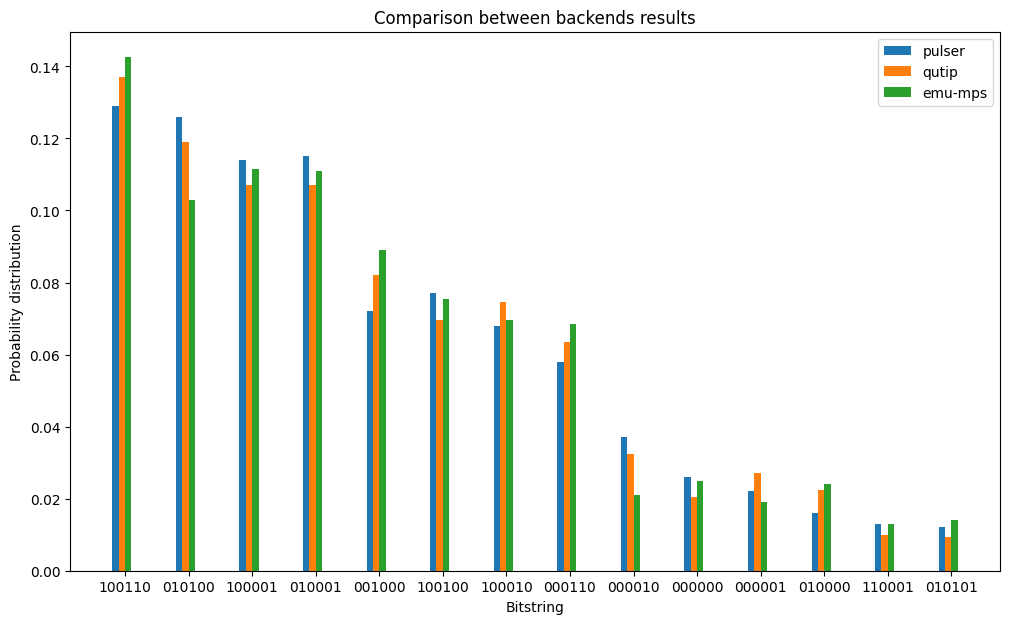
The plot below compares the bitstrings from each of the backends run above.
Note that Emu-Fresnel (a remote backend that emulates the Fresnel device specs) run with less shots than the others, which may result in bigger variances.
[29]:
def get_kv(data):
    _a = ()
    _b = ()
    _total = sum(data.values())
    for k, v in data.items():
        _a += (k,)
        _b += (v / _total,)
    return _a, _b


def get_counter(*dataset):
    _ks = dict()
    _ds = []

    for p in dataset:
        _k, _d = get_kv(p)
        _ds.append(dict(zip(_k, _d)))
        for _w, _t in p.items():
            if _w in _ks:
                _ks[_w] += _t
            else:
                _ks[_w] = _t

    for _x in _ds:
        for _c in _ks:
            if _c not in _x:
                _x[_c] = 0.0

    _ks = dict(sorted(_ks.items(), key=lambda _y: _y[1], reverse=True))
    return [{k: d[k] for k in _ks} for d in _ds], _ks
[30]:
def comparison_plot(data, size=5):
    fig = plt.figure(figsize=(12, 7))
    w = 0.1

    ax = fig.add_subplot(111)

    x_data = np.array(range(len(data[0])))[:size]

    for n, (k, v) in enumerate(
        zip(srs, ("pulser", "qutip", "emu-mps", "emu-free", "emu-fresnel"))
    ):
        plt.bar(
            x_data - 2 * w + (n * w), list(k.values())[:size], w, label=v, align="edge"
        )

    plt.title("Comparison between backends results")
    plt.ylabel("Probability distribution")
    plt.xlabel("Bitstring")
    plt.xticks(np.arange(0, size), list(data[0])[:size])
    plt.legend()
    plt.show()
[31]:
srs, crc = get_counter(pulser_res, res_qutip, res_mps) # , res_free, res_rem_mps)
[32]:
comparison_plot(srs, 14)
[ ]:
3.6 QPU
It is also possible to run the same circuit on the QPU (if it is available).
qc_qpu = deepcopy(qc) # provider_qpu = PasqalProvider(remote_config=config) # backend_qpu = provider_qpu.get_backend("fresnel") # sampler_qpu = SamplerV2(backend_qpu) # results_qpu = sampler_qpu.run([qc_qpu], shots=100).result() # print(results_qpu[0].data.counts)[ ]: